- C 87.7%
- Shell 8.1%
- Makefile 4.2%
| res | ||
| src | ||
| .gitignore | ||
| .gitmodules | ||
| install.sh | ||
| license.md | ||
| makefile | ||
| readme.md | ||

4y - Ly Fork - TUI display manager
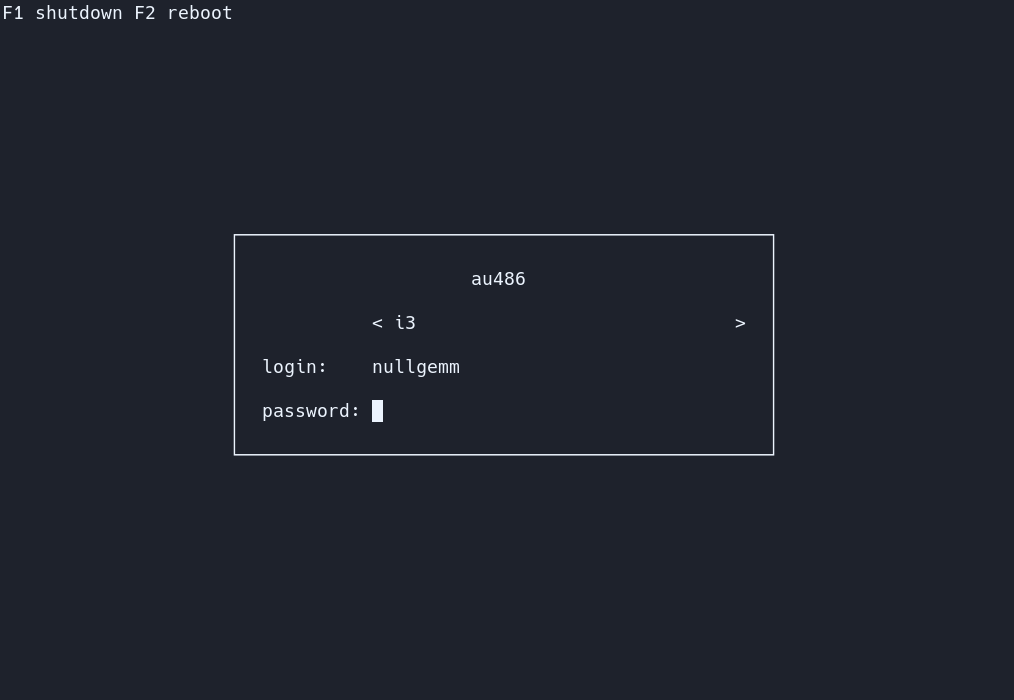
WARNING!
this fork of Ly is unfinished. please dont hate on it its still in development.
4y is a fork of Ly, It is made to be easier and have an auto install command. Ly is a lightweight TUI (ncurses-like) display manager for Linux and BSD.
Dependencies
- a C99 compiler (tested with tcc and gcc)
- a C standard library
- GNU make
- pam
- xcb
- xorg
- xorg-xauth
- mcookie
- tput
- shutdown
On Debian-based distros running apt install build-essential libpam0g-dev libxcb-xkb-dev as root should install all the dependencies for you.
Support
The following desktop environments were tested with success
- bspwm
- budgie
- cinnamon
- deepin
- dwm
- enlightenment
- gnome
- i3
- kde
- lxde
- lxqt
- mate
- qtile
- sway
- xfce
- pantheon
- maxx
- windowmaker
4y should work with any X desktop environment, and provides basic wayland support (sway works very well, for example).
systemd?
For the autoinstall script. youre gonna need systemd. however, with some tinkering you dont need systemd to do this!
Installing
just do "git clone --recurse-submodules https://github.com/M4RT1NDEV/4y.git" "cd 4y" "bash install.sh" or "./install.sh"
Configuration
You can find all the configuration in /etc/4y/config.ini.
The file is commented, and includes the default values.
Controls
Use the up and down arrow keys to change the current field, and the left and right arrow keys to change the target desktop environment while on the desktop field (above the login field).
.xinitrc
If your .xinitrc doesn't work make sure it is executable and includes a shebang. This file is supposed to be a shell script! Quoting from xinit's man page:
If no specific client program is given on the command line, xinit will look for
a file in the user's home directory called .xinitrc to run as a shell script to
start up client programs.
On ArchLinux, the example .xinitrc (/etc/X11/xinit/xinitrc) starts like this:
#!/bin/sh
Tips
The numlock and capslock state is printed in the top-right corner. Use the F1 and F2 keys to respectively shutdown and reboot. Take a look at your .xsession if X doesn't start, as it can interfere (this file is launched with X to configure the display properly).
PSX DOOM fire animation
To enable the famous PSX DOOM fire described by Fabien Sanglard,
just uncomment animate = true in /etc/ly/config.ini. You may also
disable the main box borders with hide_borders = true.
Additional Information
The name "4y" comes from the 4 in M4RT1NDEV and the y is from the name ly which is the login manager this is a fork of.
The name "Ly" is a tribute to the fairy from the game Rayman. Ly was tested by oxodao, who is some seriously awesome dude.