- Swift 48.7%
- Kotlin 42.6%
- Python 5.2%
- Shell 2.6%
- HTML 0.4%
- Other 0.5%
|
|
||
|---|---|---|
| .github/workflows | ||
| assets | ||
| data | ||
| installers | ||
| scripts | ||
| src | ||
| .gitattributes | ||
| .gitignore | ||
| build-windows.bat | ||
| CMakeLists.txt | ||
| LICENSE | ||
| Makefile | ||
| README.md | ||
| run-windows.bat | ||

maturita.c
Vzdělávací GTK 4 aplikace k přípravě na maturitu. / An educational GTK 4 app for the Czech maturita exam.
Česky
Rozhraní je v češtině a angličtině. Hotové jsou čtyři předměty; ostatní jsou zatím zamčené placeholdery. Aplikace se po instalaci aktualizuje sama.
| Úvod | Předměty | Německá cesta |
|---|---|---|
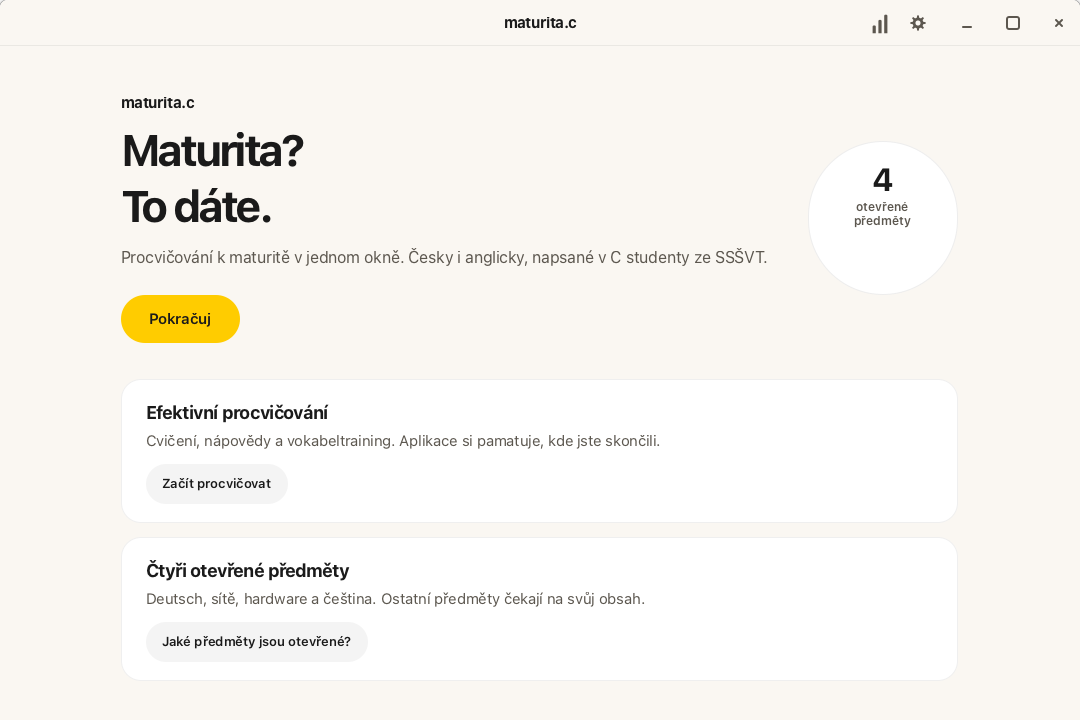 |
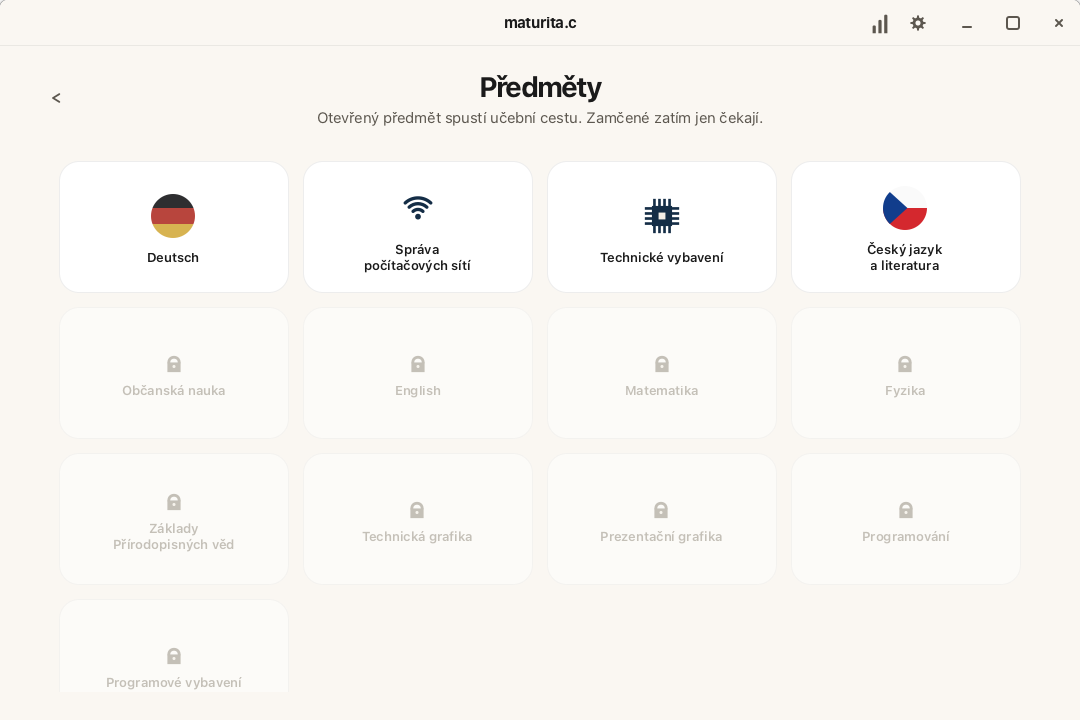 |
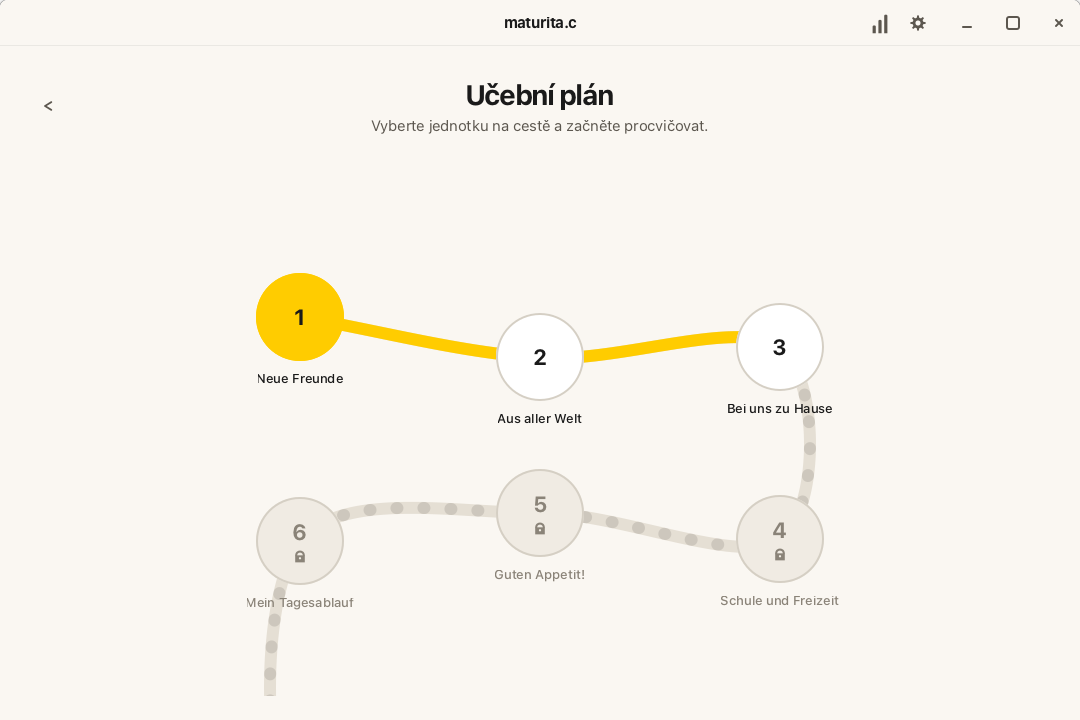 |
Instalace
Žádné releasy ani čísla verzí nejsou. CI po každém pushi na main uloží
balíčky do větve builds.
Instalátor samotnou aplikaci neobsahuje — při spuštění si dohledá aktuální
commit větve builds a stáhne ten soubor, ne kešovanou kopii podle názvu
větve.
Nejjednodušší je instalátor pro vaši platformu (soubory z main, ať
nedostanete starý skript z keše větve builds):
| Platforma | Soubor | Jak spustit |
|---|---|---|
| macOS (Apple Silicon) | maturita-installer-macos.zip | Rozbalit, v Terminálu chmod +x maturita-installer-macos.command a pak pravý klik → Otevřít |
| Windows (x64) | maturita-installer-windows.zip | Rozbalit a dvojklik na .cmd; u SmartScreenu Další informace → Přesto spustit |
| Linux (x86_64) | maturita-installer-linux.zip | Rozbalit a sh maturita-installer-linux.sh |
Kam se to nainstaluje: /Applications nebo ~/Applications (macOS),
%LOCALAPPDATA%\Programs\Maturita (Windows), ~/Applications (Linux).
Buildy zatím nejsou notarizované (chybí Apple Developer ID), proto je při
prvním spuštění potřeba výše uvedený krok navíc. Aplikace se pak udržuje
sama: po startu porovná svůj commit se souborem VERSION ve větvi builds
a aktualizaci nabídne v pruhu nahoře. Ruční kontrola je
v Nastavení → Aktualizace.
Bez instalátoru
Na větvi builds
jsou i hotové balíčky. Odkazy podle názvu větve umí CDN kešovat, proto je
spolehlivější instalátor výše, nebo stažení přímo z té stránky větve:
Postup a nastavení se ukládají vedle .app / složky / AppImage do progress/.
Intel Mac, jiná architektura nebo úpravy kódu → sestavení ze zdroje.
Co v aplikaci je
- Deutsch — 3 otevřené jednotky (Neue Freunde, Aus aller Welt, Bei uns zu Hause): cvičení, nápovědy, vokabeltraining
- Správa počítačových sítí — 1. ročník, 27 lekcí (VLSM + teorie a kvízy); ročníky 2–4 jsou zamčené
- Technické vybavení — 3 lekce (architektura, historie, bit/byte)
- Český jazyk a literatura — mluvnice (20 cvičení) a maturitní četba (1984, Spalovač mrtvol); literatura je zatím zamčená
- statistiky, 10 témat, tmavý/světlý režim, čeština/angličtina
- ukončení:
Cmd/Super+QneboAlt+F4
Použití
- Pokračuj otevře mapu předmětů.
- Otevřený předmět (vlajka, Wi‑Fi, čip, česká vlajka) vede na učební cestu.
- Uzly cvičení / lekcí otevřou obsah; zamčené nic nedělají.
- Statistiky (graf) a Nastavení (ozubené kolo) jsou vpravo nahoře.
Sestavení ze zdroje
# macOS
brew install gtk4 gcc make pkg-config

# Debian / Ubuntu
sudo apt install build-essential pkg-config libgtk-4-dev

# Fedora
sudo dnf install gcc make pkgconf-pkg-config gtk4-devel

# Arch
sudo pacman -S base-devel pkgconf gtk4
git clone https://github.com/pepaskopec-blip/maturita.c.git
cd maturita.c
make
make run          # nebo ./maturita
make bundle       # AppImage / .app zip / Windows složka s DLL
Volitelně CMake: cmake -S . -B build && cmake --build build.
Aby stažená aplikace na macOS šla otevřít bez potvrzení v Nastavení, CI potřebuje Apple Developer Program a GitHub Secrets:
MACOS_CERTIFICATE— Developer ID Application.p12v base64MACOS_CERTIFICATE_PASSWORDAPPLE_API_KEY,APPLE_API_KEY_ID,APPLE_API_ISSUER— notarizace (neboAPPLE_ID+APPLE_APP_SPECIFIC_PASSWORD+APPLE_TEAM_ID)
Bez toho zůstane jen ad-hoc podpis a Gatekeeper stažený build zablokuje.
Windows (MSYS2 UCRT64, bez Visual Studia)
winget install --id MSYS2.MSYS2 -e --source winget
C:\msys64\ucrt64.exe pacman -S --noconfirm mingw-w64-ucrt-x86_64-gcc mingw-w64-ucrt-x86_64-gtk4 mingw-w64-ucrt-x86_64-pkg-config make
V terminálu MSYS2 UCRT64:
cd /c/Users/<jméno>/maturita.c  # C:\Users\<jméno>\maturita.c v MSYS2
make
./maturita.exe
make bundle                     # dist/maturita.exe jde spustit i z Průzkumníka
Struktura
src/                 C zdroje a maturita.h
data/                style.css, share/, podpisy, Windows .rc
assets/              zdrojová ikona a screenshoty
installers/          instalátory, které stáhnou aktuální build
scripts/             balení AppImage a .app
.github/workflows/   CI: push na main → větev builds
progress/            vzniká za běhu (cvičení, nastavení)
Licence: GPL-3.0.
English
The UI is Czech and English. Four subjects are playable; the rest are locked placeholders. After install the app updates itself.
| Welcome | Subjects | German path |
|---|---|---|
|
|
|
Install
There are no releases and no version numbers. CI writes packages to the
builds branch
whenever main changes. The installer carries no app of its own — it fetches
the current builds commit when you run it, not a CDN-cached copy of the
branch-named file.
Start with the installer for your platform (files from main, so you
do not get a stale script cached from the builds branch):
| Platform | File | How to run |
|---|---|---|
| macOS (Apple Silicon) | maturita-installer-macos.zip | Unzip, chmod +x maturita-installer-macos.command in Terminal, then right-click → Open |
| Windows (x64) | maturita-installer-windows.zip | Unzip and double-click the .cmd; if SmartScreen appears, More info → Run anyway |
| Linux (x86_64) | maturita-installer-linux.zip | Unzip, then sh maturita-installer-linux.sh |
Install locations: /Applications or ~/Applications (macOS),
%LOCALAPPDATA%\Programs\Maturita (Windows), ~/Applications (Linux).
The builds are not notarized yet (no Apple Developer ID), so the first
launch still needs the extra step above. After that the app stays current:
it compares its commit to VERSION on builds and offers an update in a
banner. Manual check: Settings → Updates.
Packages without the installer
The same files live on
builds.
Branch-named raw URLs can be cached by the CDN, so prefer the installer
above, or download from that branch page:
Progress and settings live in progress/ next to the .app / folder /
AppImage.
Intel Mac, another architecture, or hacking on the code → build from source.
What’s inside
- Deutsch — 3 open units (Neue Freunde, Aus aller Welt, Bei uns zu Hause): exercises, hints, vocabulary training
- Computer networks — year 1, 27 lessons (VLSM + theory/quizzes); years 2–4 are locked
- Computer hardware — 3 lessons (architecture, history, bit/byte)
- Czech language — grammar (20 exercises) and required reading (1984, Spalovač mrtvol); literature theory is still locked
- statistics, 10 palettes, dark/light mode, Czech/English
- quit with
Cmd/Super+QorAlt+F4
Usage
- Continue opens the subject map.
- An open subject (flag, Wi‑Fi, chip, Czech flag) opens its path.
- Exercise / lesson nodes open content; locked nodes do nothing.
- Statistics (chart) and Settings (gear) sit in the top-right.
Build from source
# macOS
brew install gtk4 gcc make pkg-config

# Debian / Ubuntu
sudo apt install build-essential pkg-config libgtk-4-dev

# Fedora
sudo dnf install gcc make pkgconf-pkg-config gtk4-devel

# Arch
sudo pacman -S base-devel pkgconf gtk4
git clone https://github.com/pepaskopec-blip/maturita.c.git
cd maturita.c
make
make run          # or ./maturita
make bundle       # AppImage / .app zip / Windows DLL folder
Optional CMake: cmake -S . -B build && cmake --build build.
Skipping Gatekeeper on a downloaded macOS build needs an Apple Developer Program membership and these GitHub Secrets:
MACOS_CERTIFICATE— Developer ID Application.p12, base64-encodedMACOS_CERTIFICATE_PASSWORDAPPLE_API_KEY,APPLE_API_KEY_ID,APPLE_API_ISSUERfor notarization (orAPPLE_ID+APPLE_APP_SPECIFIC_PASSWORD+APPLE_TEAM_ID)
Without them the bundle stays ad-hoc signed and Gatekeeper still blocks it.
Windows (MSYS2 UCRT64, no Visual Studio)
winget install --id MSYS2.MSYS2 -e --source winget
C:\msys64\ucrt64.exe pacman -S --noconfirm mingw-w64-ucrt-x86_64-gcc mingw-w64-ucrt-x86_64-gtk4 mingw-w64-ucrt-x86_64-pkg-config make
In an MSYS2 UCRT64 terminal:
cd /c/Users/<name>/maturita.c   # C:\Users\<name>\maturita.c in MSYS2
make
./maturita.exe
make bundle                     # dist/maturita.exe can be double-clicked
Layout
src/                 C sources and maturita.h
data/                style.css, share/, signing files, Windows .rc
assets/              source icon and screenshots
installers/          fetch-the-latest installers
scripts/             AppImage / .app bundlers
.github/workflows/   CI: push to main → builds branch
progress/            created at runtime (exercises, settings)
License: GPL-3.0.