- Swift 48.7%
- Kotlin 42.6%
- Python 5.2%
- Shell 2.6%
- HTML 0.4%
- Other 0.5%
|
|
||
|---|---|---|
| .github/workflows | ||
| android | ||
| assets | ||
| content | ||
| data/share | ||
| Graduately.xcworkspace | ||
| installers | ||
| ios | ||
| macos | ||
| scripts | ||
| tests | ||
| .gitattributes | ||
| .gitignore | ||
| LICENSE | ||
| Makefile | ||
| README.md | ||

Graduately
Vzdělávací aplikace k přípravě na maturitu (repo Graduately). / An educational app for the Czech maturita exam (repo Graduately).
Česky
Rozhraní je v češtině a angličtině. Všechny předměty v seznamu níže jsou otevřené. Aplikace se po instalaci aktualizuje sama.
| Úvod | Němčina | Neue Freunde |
|---|---|---|
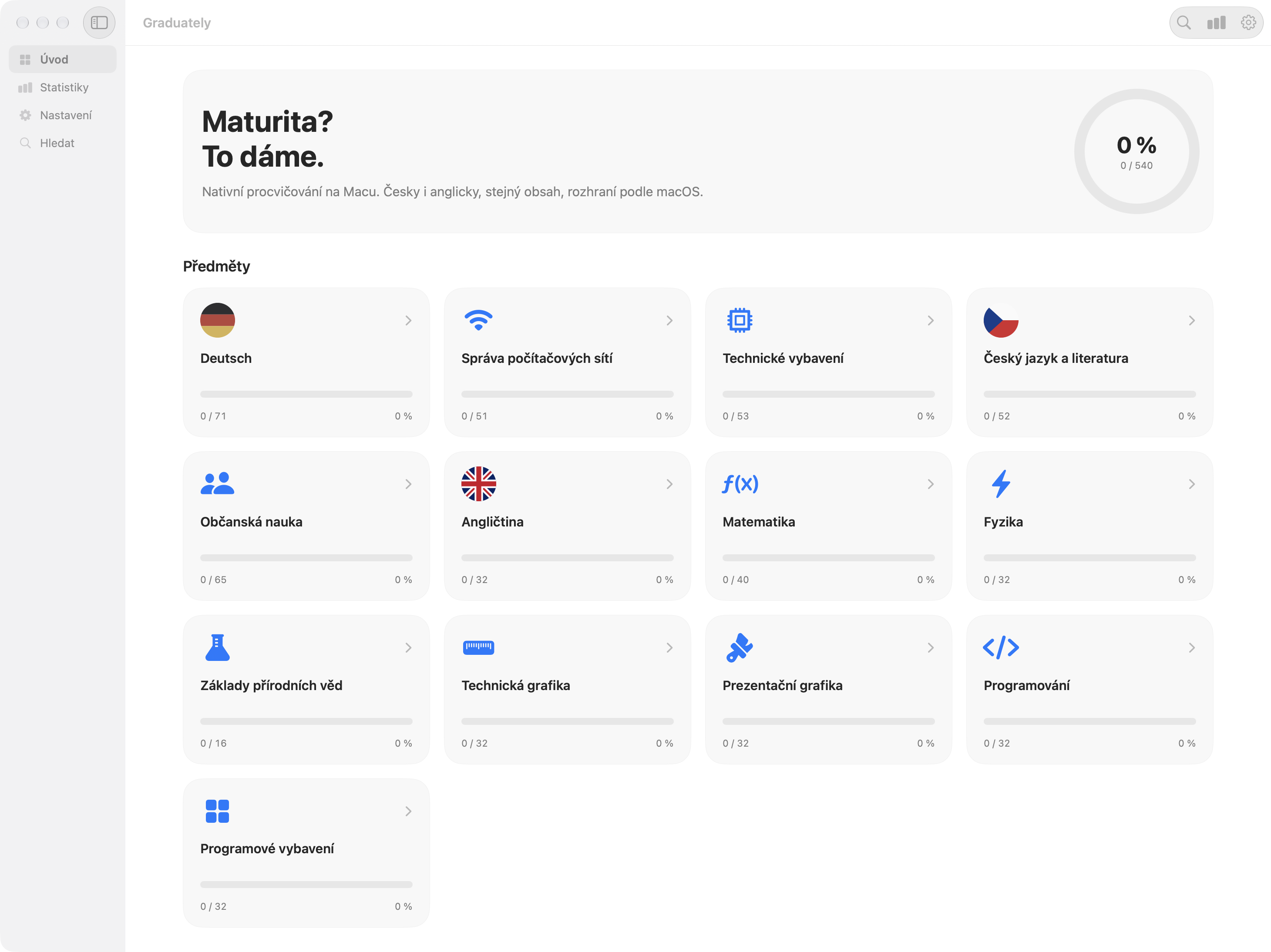 |
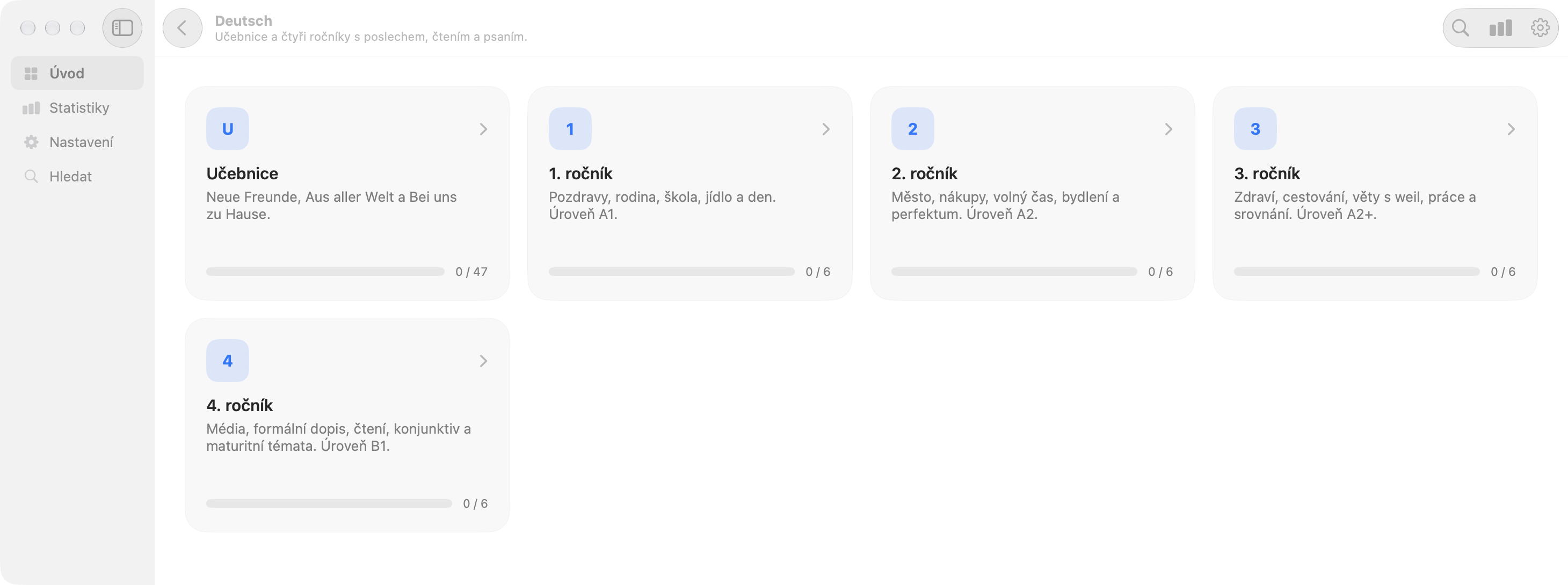 |
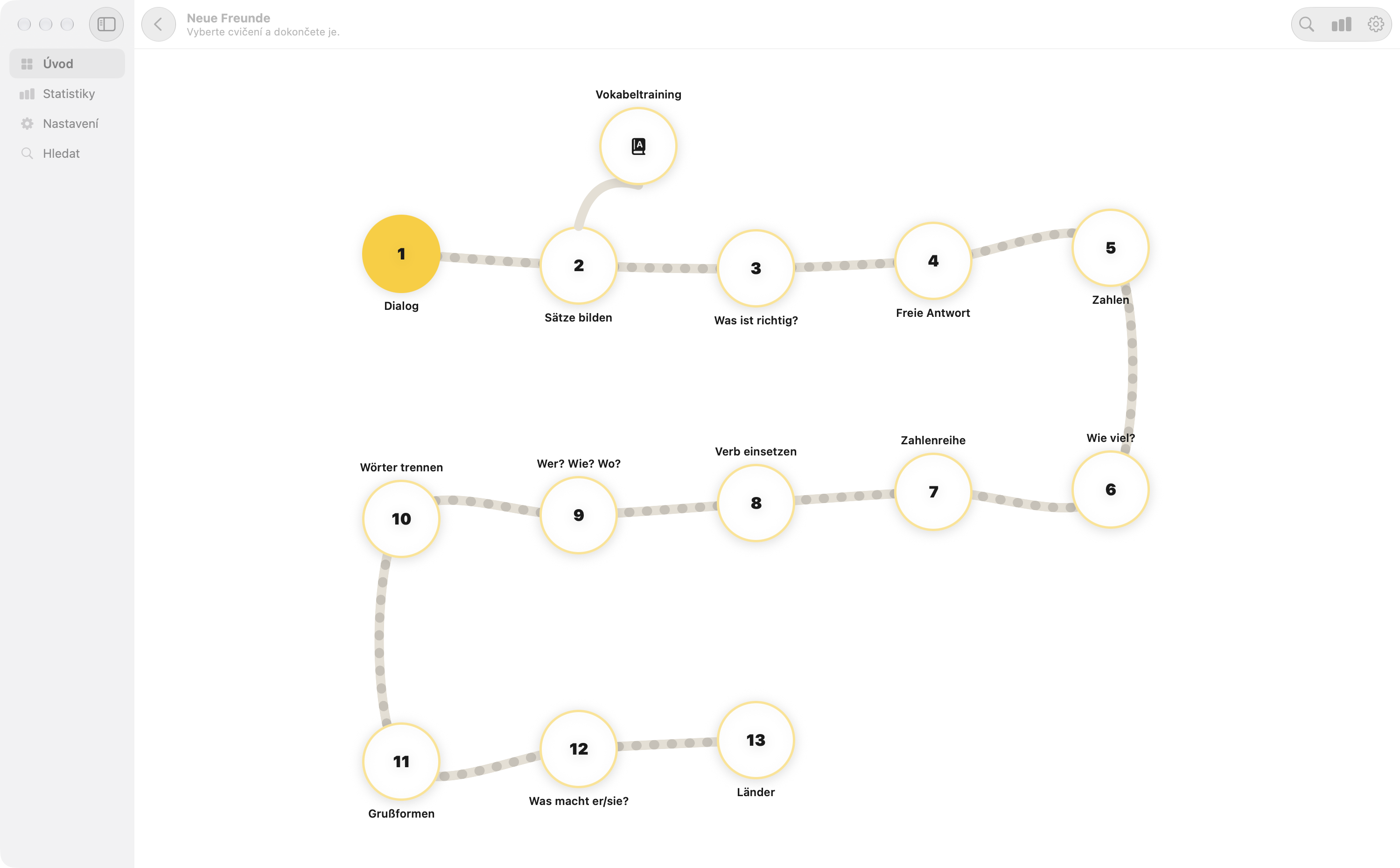 |
Instalace
Žádné releasy ani čísla verzí nejsou. CI po každém pushi na main uloží
balíčky do větve builds.
Instalátor samotnou aplikaci neobsahuje — při spuštění si dohledá aktuální
commit větve builds a stáhne ten soubor, ne kešovanou kopii podle názvu
větve.
Stáhni zip, rozbal ho a otevři instalátor. Nic víc (žádný Terminál):
| Platforma | Soubor | Jak spustit |
|---|---|---|
| macOS (Apple Silicon) | graduately-installer-macos.zip | Rozbalit, pravý klik na Nainstalovat Graduately → Otevřít |
| Windows (x64) | graduately-installer-windows.zip | Rozbalit a dvojklik; u SmartScreenu Další informace → Přesto spustit |
| Linux (x86_64) | graduately-installer-linux.zip | Rozbalit a dvojklik na instalátor |
| Android (8+) | graduately-installer-android.zip | Rozbalit, otevřít Stahnout Graduately.html a nainstalovat APK (neznámé zdroje) |
| iOS (26+) | graduately-installer-ios.zip | Rozbalit, otevřít Jak nainstalovat Graduately.html. Nejjednodušší: Xcode na Macu, nebo IPA přes AltStore |
Kam se to nainstaluje: /Applications nebo ~/Applications (macOS),
%LOCALAPPDATA%\Programs\Graduately (Windows), ~/Applications (Linux).
Buildy zatím nejsou notarizované (chybí Apple Developer ID), proto je při
prvním spuštění potřeba výše uvedený krok navíc. Aplikace se pak udržuje
sama: po startu porovná svůj commit se souborem VERSION ve větvi builds
a aktualizaci nabídne v pruhu nahoře. Ruční kontrola je
v Nastavení → Aktualizace.
Bez instalátoru
Na větvi builds
jsou i hotové balíčky. Odkazy podle názvu větve umí CDN kešovat, proto je
spolehlivější instalátor výše, nebo stažení přímo z té stránky větve:
- graduately-macos-arm64.zip
- graduately-windows-x64.zip
- graduately-linux-x86_64.AppImage
- graduately-android.apk
- graduately-ios.ipa
Na Linuxu a Windows se postup a nastavení ukládají do progress/ vedle
AppImage / ve složce aplikace; postup ze starší GTK verze se při prvním
spuštění převezme. Na Androidu, iOS a macOS do úložiště aplikace (stejné
statistiky, témata a jazyk).
Intel Mac, jiná architektura nebo úpravy kódu → sestavení ze zdroje.
Co v aplikaci je
- Deutsch — učebnice (Neue Freunde, Aus aller Welt, Bei uns zu Hause) a 4 ročníky, 24 lekcí od A1 k B1: poslech, čtení, psaní, doplňování a kvízy
- Správa počítačových sítí — 4 ročníky: 1. ročník má 27 lekcí (adresy, modely, přepínače a bezdrát), ročníky 2–4 po 8 lekcích (VLAN, směrování, firewall, návrh a maturita)
- Technické vybavení — 4 ročníky: 1. ročník má 29 lekcí (architektura, data, skříň, deska, karty, disky a vstup), ročníky 2–4 po 8 lekcích (monitory, sestavení, RAID, servery, údržba)
- Technická grafika — 4 ročníky AutoCADu, v každém 8 lekcí: výkres a souřadnice, úpravy a kóty, pohledy a tisk, 3D a maturitní zadání
- Prezentační grafika — 4 ročníky, v každém 8 lekcí: Photoshop od pixelu po plakát, Premiere Pro a ve čtvrtém ročníku Illustrator, After Effects a InDesign
- Programové vybavení — 4 ročníky, v každém 8 lekcí: Windows a licence, Word a Excel, Access a MySQL, pak WordPress, Power BI, dávkové soubory a zásady
- Programování — 4 ročníky C# po vzoru W3Schools. U každé lekce se kód píše a spouští vedle výkladu, od výpisu po třídy, LINQ a async
- Český jazyk a literatura — literatura (4 ročníky, 32 lekcí podle osnov středních škol), mluvnice (20 cvičení) a maturitní četba (82 knih: zápisky, kvíz, sestavení děje)
- Matematika — opakování základní školy a 4 ročníky, 40 lekcí; příklady se píšou a kontrolují, u geometrie jde i rýsovat na mřížku
- Fyzika — 4 ročníky, 32 lekcí podle osnov středních škol (mechanika, teplo a vlny, elektřina a magnetismus, optika až astrofyzika)
- Základy přírodních věd — chemie a biologie, v každé 8 lekcí (od atomu a buňky po biochemii a ekologii) s výkladem a kvízem
- Občanská nauka — 1. ročník, 17 lekcí (člověk v lidském společenství); 2. ročník, 16 lekcí (člověk jako občan); 3. ročník, 16 lekcí (člověk a právo); 4. ročník, 16 lekcí (hospodářství, svět a filozofie)
- Angličtina — 4 ročníky, 32 lekcí podle osnov gymnázia (A2 až maturita): poslech, čtení, psaní, doplňování, kvízy a ročníkové testy
- statistiky, hledání (lupa nebo
Cmd/Ctrl+K), 10 témat, tmavý/světlý režim, čeština/angličtina - ukončení:
Ctrl/Cmd+QneboAlt+F4, zpět:Esc
Použití
- Úvod ukáže postup a mřížku předmětů. Každý předmět spustí svou cestu.
- U němčiny je učebnice (Neue Freunde, Aus aller Welt, Bei uns zu Hause) a čtyři ročníky. Ostatní předměty mají ročníky, lekce nebo knihy.
- Z cesty se otevře výklad, poslech, čtení, psaní nebo kvíz.
- Statistiky, Nastavení a Hledat jsou v postranním panelu na Macu. Na telefonu a v desktopové aplikaci jsou na záložkách, hledání navíc ikonou lupy. Zkratka je
Cmd/Ctrl+K.
Sestavení ze zdroje
Dvě kódové základny, jeden obsah (content/) a společné testy (tests/):
- Kotlin + Compose (
android/): Android, Linux a Windows. Obrazovky, cvičení a kontrola odpovědí jsou vandroid/shared/, platformy se liší jen vstupním bodem (android/app,android/desktop). - Swift + SwiftUI (
ios/,macos/): iPhone a Mac (Xcode 26, macOS 26+).
git clone https://github.com/pepaskopec-blip/Graduately.git
cd Graduately
make test         # kontrola odpovědí v Kotlinu (a ve Swiftu, je-li Xcode)
Linux, Windows (i Mac pro vývoj) — stačí JDK 17+ a Python 3:
make run          # spustí desktopovou aplikaci ze zdroje
make linux        # dist/graduately-linux-x86_64.AppImage
make windows      # dist/graduately-windows-x64.zip (v Git Bash)
make smoke        # instalátory, obsah, testy, dostupnost builds
Na balení (make linux / make windows) je potřeba JDK s jmods, např.
Temurin 21; cestu k němu předejte v PACKAGE_JDK. ProGuard zmenší balíček
pod limit GitHubu 100 MB.
Na Macu:
open Graduately.xcworkspace        # scheme Graduately z macos/Graduately.xcodeproj
# nebo: make macos                 # zip v dist/graduately-macos-arm64.zip
Na macOS make macos automaticky vloží aktuální Git commit, aby fungovala
kontrola aktualizací. Při balení ze zdrojů bez .git zadejte
COMMIT=<zdrojový-commit> make macos.
Aby stažená aplikace na macOS šla otevřít bez potvrzení v Nastavení, CI potřebuje Apple Developer Program a GitHub Secrets:
MACOS_CERTIFICATE— Developer ID Application.p12v base64MACOS_CERTIFICATE_PASSWORDAPPLE_API_KEY,APPLE_API_KEY_ID,APPLE_API_ISSUER— notarizace (neboAPPLE_ID+APPLE_APP_SPECIFIC_PASSWORD+APPLE_TEAM_ID)
Bez toho zůstane jen ad-hoc podpis a Gatekeeper stažený build zablokuje.
Struktura
content/             texty lekcí, cvičení a knih v Markdownu (viz content/README.md)
android/shared/      společný Kotlin: obrazovky, cvičení, kontrola odpovědí, postup
android/app/         Android (vstupní bod, aktualizace APK, předčítání)
android/desktop/     Linux a Windows (okno, aktualizace, předčítání, import z GTK)
ios/                 SwiftUI pro iPhone
macos/               SwiftUI pro Mac (sdílí kód s ios/)
tests/               společné testy kontroly odpovědí (answers.json) + Swift harness
data/share/          ikony a .desktop soubor
assets/              zdrojová ikona a screenshoty
installers/          instalátory, které stáhnou aktuální build
scripts/             build-content.py, balení AppImage, zip, .app, IPA a smoke test
.github/workflows/   CI: push na main → větev builds
Android ze zdroje (JDK 17 + Android SDK):
cd android
./gradlew :app:assembleRelease   # obsah z content/ se sestaví sám
# APK: android/app/build/outputs/apk/release/app-release.apk
nebo z kořene make android.
APK se podepisuje klíčem android/keystore/sideload.jks (není tajný – jde o
sideload, ne o Google Play), aby aktualizace z aplikace šla nainstalovat přes
předchozí build. Vlastní klíč lze dodat přes MATURITA_KEYSTORE a
MATURITA_KEYSTORE_PASSWORD. Buildy android-5 a starší mají jiný podpis –
jednou odinstalujte a nainstalujte znovu.
iOS ze zdroje (Xcode 26, iOS 26+ / Liquid Glass):
open Graduately.xcworkspace        # v kořeni repozitáře
# Simulátor: vyber iPhone a Run, nic dalšího není potřeba (obsah se
# sestaví z content/ při buildu). Na iPhone: v Signing vyber svůj Team.
# nebo: make ios   # unsigned IPA v dist-ios/graduately-ios.ipa
Workspace odkazuje na ios/Graduately.xcodeproj a macos/Graduately.xcodeproj.
Projekty nepřesouvejte – build čte ../content a ../scripts.
Licence: GPL-3.0.
English
The UI is Czech and English. Every subject listed below is open. After install the app updates itself.
| Welcome | German | Neue Freunde |
|---|---|---|
|
|
|
Install
There are no releases and no version numbers. CI writes packages to the
builds branch
whenever main changes. The installer carries no app of its own — it fetches
the current builds commit when you run it, not a CDN-cached copy of the
branch-named file.
Download the zip, unzip it, and open the installer. No Terminal:
| Platform | File | How to run |
|---|---|---|
| macOS (Apple Silicon) | graduately-installer-macos.zip | Unzip, right-click Nainstalovat Graduately → Open |
| Windows (x64) | graduately-installer-windows.zip | Unzip and double-click; if SmartScreen appears, More info → Run anyway |
| Linux (x86_64) | graduately-installer-linux.zip | Unzip and double-click the installer |
| Android (8+) | graduately-installer-android.zip | Unzip, open Stahnout Graduately.html, then install the APK (unknown sources) |
| iOS (26+) | graduately-installer-ios.zip | Unzip, open Jak nainstalovat Graduately.html. Easiest: Xcode on a Mac, or the IPA via AltStore |
Install locations: /Applications or ~/Applications (macOS),
%LOCALAPPDATA%\Programs\Graduately (Windows), ~/Applications (Linux).
The builds are not notarized yet (no Apple Developer ID), so the first
launch still needs the extra step above. After that the app stays current:
it compares its commit to VERSION on builds and offers an update in a
banner. Manual check: Settings → Updates.
Packages without the installer
The same files live on
builds.
Branch-named raw URLs can be cached by the CDN, so prefer the installer
above, or download from that branch page:
- graduately-macos-arm64.zip
- graduately-windows-x64.zip
- graduately-linux-x86_64.AppImage
- graduately-android.apk
- graduately-ios.ipa
On Linux and Windows, progress and settings live in progress/ next to the
AppImage / in the app folder; progress from the older GTK build is taken over
on first launch. On Android, iOS and macOS they stay in app storage (same
stats, themes, language).
Intel Mac, another architecture, or hacking on the code → build from source.
What’s inside
- Deutsch — the textbook (Neue Freunde, Aus aller Welt, Bei uns zu Hause) plus 4 years, 24 lessons from A1 to B1: listening, reading, writing, gap-fill and quizzes
- Computer networks — 4 years: year 1 has 27 lessons (addresses, models, switches and wireless), years 2–4 have 8 lessons each (VLANs, routing, firewalls, design and the exam)
- Computer hardware — 4 years: year 1 has 29 lessons (architecture, data, case, board, cards, drives and input), years 2–4 have 8 lessons each (displays, assembly, RAID, servers, maintenance)
- Technical graphics — 4 years of AutoCAD, 8 lessons each: the sheet and coordinates, editing and dimensions, views and plotting, 3D and the exam drawing
- Presentation graphics — 4 years, 8 lessons each: Photoshop from the pixel to a poster, Premiere Pro, and in year 4 Illustrator, After Effects and InDesign
- Software — 4 years, 8 lessons each: Windows and licences, Word and Excel, Access and MySQL, then WordPress, Power BI, batch files and policy
- Programming — 4 years of C# in the style of W3Schools. Each lesson has code you edit and run beside the explanation, from output to classes, LINQ and async
- Czech language — literature (4 years, 32 lessons from the secondary-school syllabus), grammar (20 exercises) and required reading (82 books: notes, quiz, plot ordering)
- Mathematics — elementary-school review and 4 years, 40 lessons; examples are typed and checked, and some geometry is drawn on a grid
- Physics — 4 years, 32 lessons from the secondary-school syllabus (mechanics, heat and waves, electricity and magnetism, optics through astrophysics)
- Natural sciences — chemistry and biology, eight lessons each (from the atom and the cell to biochemistry and ecology), with an overview and a quiz
- Civics — year 1, 17 lessons (the individual and society); year 2, 16 lessons (the citizen in a democratic state); year 3, 16 lessons (the individual and the law); year 4, 16 lessons (the economy, the world and philosophy)
- English — 4 years, 32 lessons from the gymnasium syllabus (A2 through the maturita): listening, reading, writing, gap-fill, quizzes and year tests
- statistics, search (magnifier or
Cmd/Ctrl+K), 10 palettes, dark/light mode, Czech/English - quit with
Ctrl/Cmd+QorAlt+F4, back withEsc
Usage
- Welcome shows progress and the subject grid. A subject starts its path.
- German has the textbook (Neue Freunde, Aus aller Welt, Bei uns zu Hause) and four years. The other subjects have years, lessons or books.
- A path opens an overview, listening, reading, writing or a quiz.
- Statistics, Settings and Search sit in the sidebar on Mac. On the phone and the desktop app they are tabs, with search also on the magnifier. The shortcut is
Cmd/Ctrl+K.
Build from source
Two code bases, one content tree (content/) and shared tests (tests/):
- Kotlin + Compose (
android/): Android, Linux and Windows. Screens, exercises and answer checking live inandroid/shared/; the platforms only differ in their entry point (android/app,android/desktop). - Swift + SwiftUI (
ios/,macos/): iPhone and Mac (Xcode 26, macOS 26+).
git clone https://github.com/pepaskopec-blip/Graduately.git
cd Graduately
make test         # answer checks in Kotlin (and Swift when Xcode is there)
Linux, Windows (and a Mac for development) need JDK 17+ and Python 3:
make run          # run the desktop app from source
make linux        # dist/graduately-linux-x86_64.AppImage
make windows      # dist/graduately-windows-x64.zip (in Git Bash)
make smoke        # installers, content, tests, builds availability
Packaging (make linux / make windows) needs a JDK that ships jmods,
such as Temurin 21; pass its path in PACKAGE_JDK. ProGuard keeps the
package under GitHub's 100 MB limit.
On a Mac:
open Graduately.xcworkspace        # scheme Graduately from macos/Graduately.xcodeproj
# or: make macos                   # zip at dist/graduately-macos-arm64.zip
On macOS, make macos embeds the current Git commit so the installed app
can check for updates. When packaging a source export without .git, use
COMMIT=<source-commit> make macos.
Skipping Gatekeeper on a downloaded macOS build needs an Apple Developer Program membership and these GitHub Secrets:
MACOS_CERTIFICATE— Developer ID Application.p12, base64-encodedMACOS_CERTIFICATE_PASSWORDAPPLE_API_KEY,APPLE_API_KEY_ID,APPLE_API_ISSUERfor notarization (orAPPLE_ID+APPLE_APP_SPECIFIC_PASSWORD+APPLE_TEAM_ID)
Without them the bundle stays ad-hoc signed and Gatekeeper still blocks it.
Layout
content/             lesson, exercise and book texts in Markdown (see content/README.md)
android/shared/      shared Kotlin: screens, exercises, answer checking, progress
android/app/         Android (entry point, APK updates, speech)
android/desktop/     Linux and Windows (window, updates, speech, GTK progress import)
ios/                 SwiftUI for iPhone
macos/               SwiftUI for Mac (shares code with ios/)
tests/               shared answer-check cases (answers.json) + Swift harness
data/share/          icons and the .desktop file
assets/              source icon and screenshots
installers/          fetch-the-latest installers
scripts/             build-content.py, AppImage / zip / .app / IPA bundlers, smoke test
.github/workflows/   CI: push to main → builds branch
Android from source (JDK 17 + Android SDK):
cd android
./gradlew :app:assembleRelease   # content/ is built automatically
# APK: android/app/build/outputs/apk/release/app-release.apk
or make android from the repo root.
The APK is signed with android/keystore/sideload.jks (not a secret – this is
a sideloaded app, not a Play release) so in-app updates install over the
previous build. Supply your own key through MATURITA_KEYSTORE and
MATURITA_KEYSTORE_PASSWORD. Builds android-5 and older carry a different
signature – uninstall once and install again.
iOS from source (Xcode 26, iOS 26+ / Liquid Glass):
open Graduately.xcworkspace        # at the repo root
# Simulator: pick an iPhone and Run, nothing else needed (content is
# built from content/ during the build). Device: pick your Team.
# or: make ios   # unsigned IPA at dist-ios/graduately-ios.ipa
The workspace points at ios/Graduately.xcodeproj and macos/Graduately.xcodeproj.
Do not move the projects – the build reads ../content and ../scripts.
License: GPL-3.0.